System Overview
The OpenClaw infrastructure is built around five core concerns: inference (AI models), automation (workflows), memory (continuity), monitoring (observability), and file serving (asset delivery). All components run in Docker containers on a single VPS with proper network isolation.

Architecture Layers
Edge (Internet → HTTPS)
Internet users connect via HTTPS. All traffic is encrypted and routed through a single entry point: Nginx reverse proxy.
Routing (Nginx)
Single reverse proxy with 4 virtual hosts (subdomains). Routes traffic to: OpenClaw Gateway, n8n Automation, Conductor Dashboard, File Server.
Services (OpenClaw + n8n + Dashboard)
Three primary workloads: the agent runtime (Gateway), automation engine (n8n), and observability dashboard (Conductor). Each connects to PostgREST.
Data Layer (PostgreSQL)
Single PostgreSQL instance. All agent state, memory, summaries, and metrics are stored here. PostgREST exposes it via REST API.
Inference (Ollama)
Local LLM (Llama 3.2) running in another container. Used by agents for embeddings and reasoning. No external API dependency.
File Serving
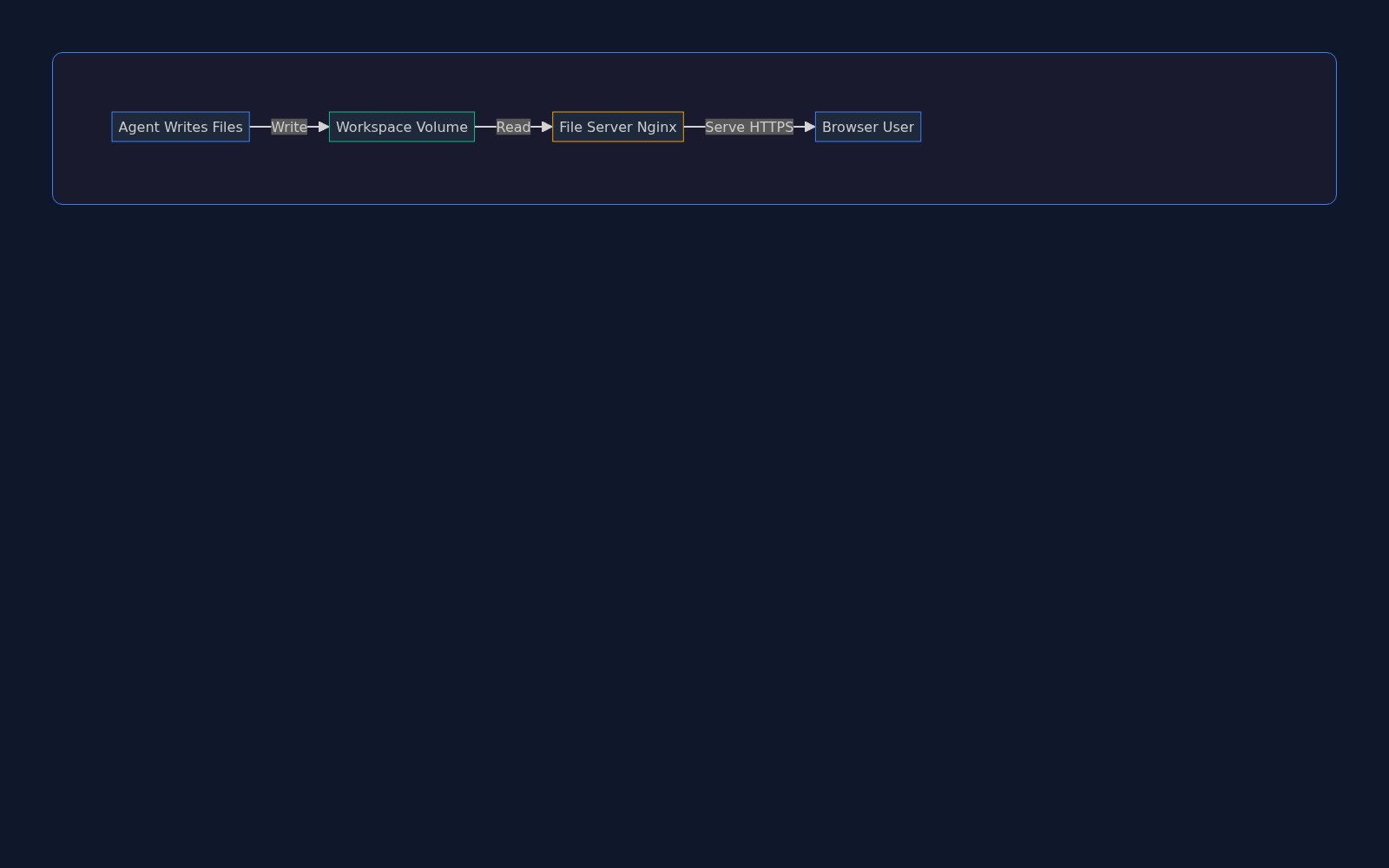
Agents write to a shared workspace volume. A dedicated read-only file server (Nginx) exposes files via HTTPS for instant access via URL.
Conductor Dashboard: Mission Control
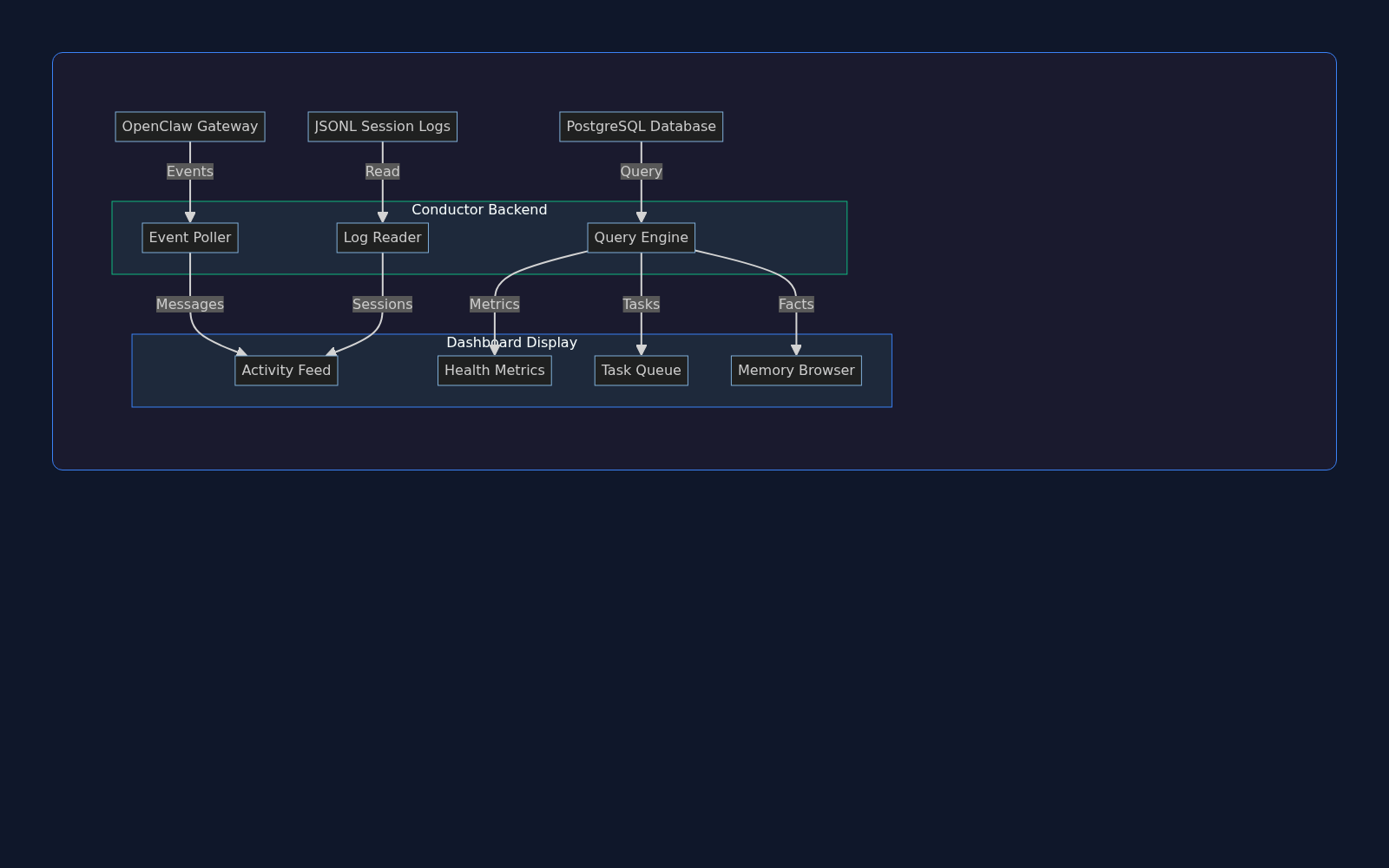
The Conductor Dashboard is the observability layer. It collects data from three sources (Gateway events, JSONL logs, PostgreSQL queries) and presents a unified view of agent activity, health metrics, task queue, and system memory.
Key Features
Activity Feed
Live stream of agent messages, tool calls, and responses. Shows timestamp, user, channel, and full message content. Searchable and filterable.
Health Metrics
Real-time system status: Gateway uptime, PostgreSQL connection pool, token usage, error rate. Trends over the last 24 hours with alerts.
Workshop Tasks
Kanban-style task queue. Agent-generated TODO items, PRs to review, research items. Drag-drop between Backlog, In Progress, Done.
Memory Browser
Deep dive into agent memory. View HOT rows in memory_kv, session summaries, conversation history, and knowledge base documents.
Cron Jobs
Scheduled task history. Full-backup status, log rotation, TTL cleanup. Shows last run time, next run time, and success/failure.
Backups
S3 backup status, restore options, backup history. Automated daily full backups. Incremental snapshots available.
Data Flow
Event Polling
Poller listens on OpenClaw Gateway for messages, tool calls, and agent state changes in real-time.
Log Reading
Reader tails the JSONL session logs (one per agent session) and extracts structured session data.
Query Engine
Engine executes time-series queries on PostgreSQL (metrics, tasks, health) and formats results for dashboard display.
Display
Results are rendered in the web dashboard: activity feed, health chart, task list, memory browser.
Heartbeat System: Periodic Maintenance
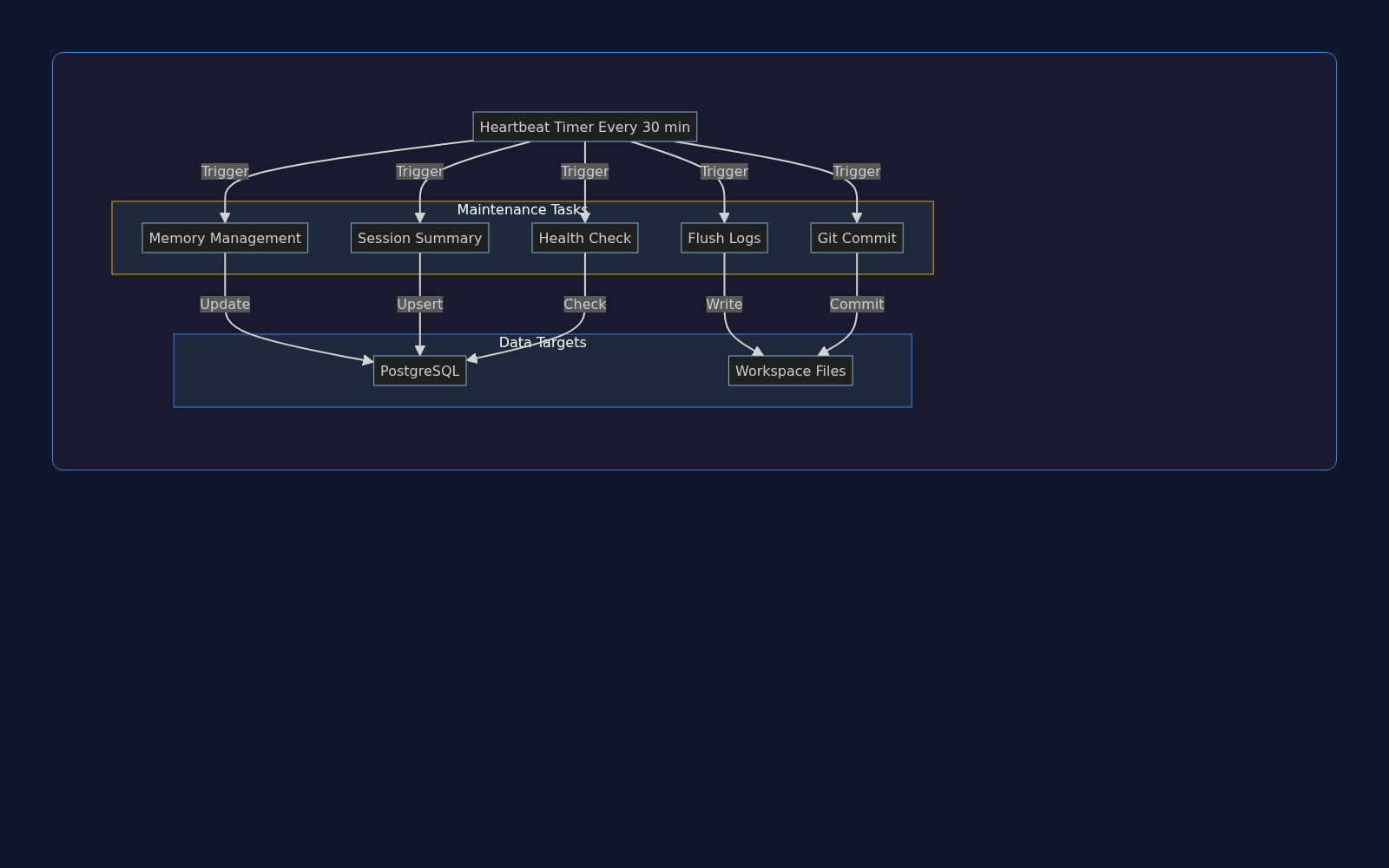
Every 30 minutes, the Gateway fires a heartbeat—a proactive maintenance cycle that flushes memory, archives logs, commits changes to Git, and checks system health. This keeps context window bounded and ensures data durability.
Maintenance Tasks
Memory Management
Sessions older than 30 days are archived. HOT rows in memory_kv (above size threshold) are pruned. Recent summaries are cached.
Session Summary
Active session summary is written to PostgreSQL (conversation_summaries table) with 30-day TTL. Used for cross-session recall.
Log Flushing
JSONL logs older than N days are compressed and archived to S3. Recent logs stay in workspace for fast access.
Git Commit
All workspace changes (diagrams, docs, scripts, configs) are staged and committed to the main repo. Push to origin/main.
Health Check
Verify all critical services are running: PostgreSQL, Redis, n8n, Ollama. Log metrics: CPU, memory, disk, network I/O.
Cleanup
Remove temporary files, vacuum PostgreSQL, prune Docker images, rotate nginx logs. Keep disk usage below 80%.
Targets
PostgreSQL
Memory rows are upserted (with TTL), session summaries inserted, cleanup queries executed (vacuuming, index maintenance).
Workspace Files
Git commit writes to .git/, log rotation writes to logs/ archive, session dumps to memory/YYYY-MM-DD.md.
S3
Compressed old logs uploaded to s3://openclaw-logs-archive/. Backups synced to s3://openclaw-backups/.
File Service: Agent-Generated Assets
The agent writes files to the workspace volume (diagrams, research documents, images, etc.). A dedicated read-only file server exposes these at HTTPS, making them instantly accessible via URL. No upload, no transfer—just a shared volume.
File Types & Locations
Diagrams
/diagrams/ — Mermaid/Graphviz SVG + PNG renders of architecture, workflows, data models, decision trees.
Research
/research/ — Deep-research markdown exports, PDF summaries, literature reviews, curated resources.
Slides
/slides/ — Presentation HTML (Keynote-style dark theme), JSON slide definitions, speaker notes.
Images
/images/ — Generated images (DALL-E, Replicate), screenshots, profile pictures, brand assets.
Documents
/docs/ — Auto-generated docs (API reference, schema diagrams), README renders, checklists.
Video
/video/ — Thumbnail previews, metadata files, caption SRT files, streaming manifests.
Public URLs
All files are served over HTTPS via files.nerdbox.com:
https://files.nerdbox.com/diagrams/openclaw-infrastructure-architecture.html
https://files.nerdbox.com/research/my-research-topic.md
https://files.nerdbox.com/slides/presentation.html
https://files.nerdbox.com/images/generated-image.png
Access Control
Public Files
Documentation, diagrams, presentations. Accessible to anyone. Use this for public-facing content.
Private Files
Research notes, drafts, personal documents. Stored in workspace but NOT served via file server.
Authentication
File server runs read-only. No upload capability. Auth layer handled by reverse proxy (if needed).
Security & Isolation
Security is built into every layer: network isolation, authentication, rate limiting, audit logging, and secret management.
Network Security
Reverse Proxy (Nginx)
Single entry point. HTTPS/TLS enforced. Rate limiting, DDoS protection, bot detection. Nginx ModSecurity optional.
Container Network
All services on internal bridge network. No direct internet access except through Nginx. SSH/telnet not exposed.
Firewall (UFW)
Host firewall: SSH (22), HTTP (80), HTTPS (443) only. All other ports blocked. Fail2ban for brute-force protection.
Volume Isolation
Workspace volume mounted read-write to agent, read-only to file server. Database volume encrypted. Backups encrypted at rest.
Authentication & Authorization
API Authentication
PostgREST uses JWT. All HTTP requests include Authorization header. Token expiry: 24 hours. Rotation on login.
Database Access
PostgreSQL user/password auth. Separate roles for services (readonly, readwrite). No direct SQL access from agents.
Service-to-Service
Internal services auth via private network. n8n ↔ Gateway via internal webhook. PostgREST ↔ Database via role-based access.
Admin Access
Dashboard admin login. SSH key-based (no password). Sudo for privileged ops. All admin actions logged to audit table.
Data Protection
Encryption at Rest
PostgreSQL database volumes encrypted with LUKS2. S3 backups encrypted with AWS KMS. Secrets stored in .env (not in git).
Encryption in Transit
All HTTP traffic upgraded to HTTPS. TLS 1.2+. Certificates via Let's Encrypt (auto-renewed). Internal traffic unencrypted (trusted network).
Secret Management
.env file (not committed). Loaded at container startup. Secrets: GitHub token, OpenAI API key, pCloud token, database password.
Audit Logging
All agent actions logged: messages sent, files written, queries executed, external API calls. Stored in PostgreSQL audit_log table. 90-day retention.
Disaster Recovery
Backup Strategy
Daily full backup (2 AM UTC). Incremental snapshots every 6 hours. Retention: 30 days full backups, 7 days incremental. Off-site (S3).
Restore Procedure
Restore from backup tar: uncompress, overlay workspace volume, restart containers. Full restore time: <5 minutes. RTO <5min, RPO <6h.
Version Control
All code, docs, configs in Git. Heartbeat auto-commits changes hourly. Easy rollback to any commit. GitHub private repo.
Monitoring & Alerts
Health checks every 5 min. Alerts on: service down, disk >80%, memory >85%, error rate >5%, backup failure.
Compliance & Best Practices
Least Privilege
Each service gets only the permissions it needs. Database roles are granular. File permissions: 644 (public), 600 (private).
Defense in Depth
Multiple layers: firewall, rate limiting, input validation, SQL prepared statements, CSRF tokens, CSP headers.
Supply Chain Risk
Docker images pinned to specific versions. Dependencies reviewed before pull. Source code on GitHub is version-controlled. Any unauthorized change is auditable.